



Claim a Free $5000 Challenge Account
Follow this step-by-step guide to register, activate, and access your free $5,000 trading challenge account. Everything is explained so you can do it without screenshots.
1. Sign Up
Go to the registration page and create an account. Fill in your name, email, and a secure password. Verify your email by clicking the link sent to you.
2. Access Your Dashboard
Log in after email verification. You’ll land on your profile dashboard — this is where you start your challenge.
3. Start a New Challenge
Find the “Start Challenge” or “New Challenge” button to begin.
4. Select the $5,000 Account
Choose the $5,000 challenge account from available options.
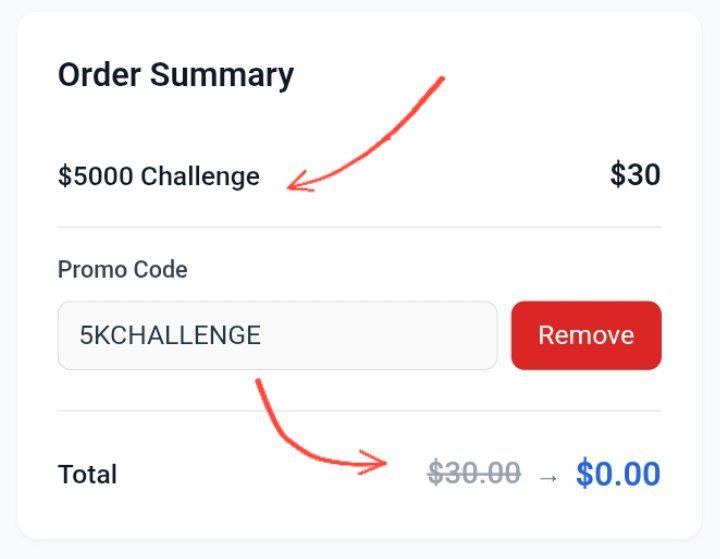
5. Apply the Promo Code
Enter the promo code during signup. Price should drop to $0.00.
6. Proceed to Checkout
Make sure total cost is zero before completing your order.
7. Complete Purchase
Click Complete Purchase. No payment is processed.
8. Confirm Success
Look for “Purchase Complete” or “Challenge Activated.”
9. Access Your Trading Dashboard
Log in at this link. Your $5,000 account should appear.
10. Start Trading
Follow the rules and track progress in your dashboard.
Important Notes
About the Author







I glanced to here on your website
❤️
https://thefxuniverse.com/how-to-claim-the-5000-challenge-account-free-step-by-step-with-screenshots/
bhai challange show nhi ho ra koi sa bhi challange nhi show ho ra.
bro 1 September announcement date hai
Your point of view caught my eye and was very interesting. Thanks. I have a question for you. https://www.binance.info/register?ref=IXBIAFVY
Can you be more specific about the content of your article? After reading it, I still have some doubts. Hope you can help me.